I created a slalom driving simulator and put Claude & Copilot behind the wheel.
How does it work?
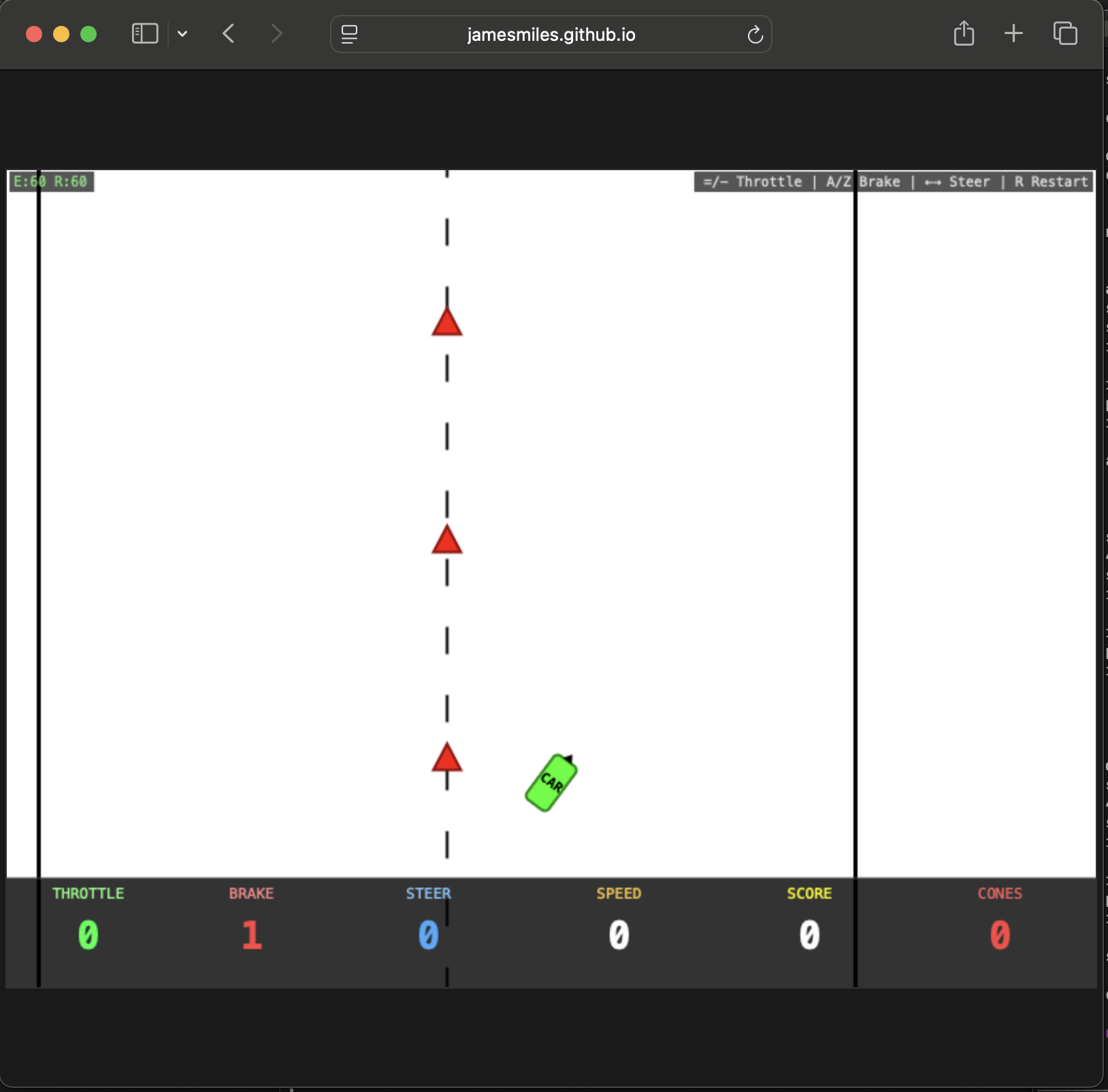
The simulator is a simple 2D web game: a bird's-eye-view slalom course with cones to weave through and a finish line to reach. The car is controlled entirely via keyboard input — throttle, brake, and steering are all incremental key presses.
Claude and Copilot are given access to screenshot capture and keyboard input tools, and instructed to drive the car using an AOAD loop: act (press keys), observe (take a screenshot), analyse (reason about position, heading, and upcoming gates), and decide (adjust controls or report failure). No special APIs, no game integration — they see exactly what you'd see on screen and press the same keys you would.
Observations
The obvious problem is latency. In theory, the model could work around this by taking small, incremental steps — adjusting controls, observing the result, analysing, then deciding — before committing to the next move. In practice:
- Haiku 4.6 and GPT 5.4 mini started off by hitting the gas and running over all the cones.
- GPT 5.4 was the most cautious. It correctly made lots of small throttle movements and positioning changes, before systematically running over a cone it thought it was safely turning around.
- Opus and Sonnet kept turning off the track and crashing.
A few other things stood out:
- The models I tested struggle to correctly determine the direction the car is pointing. The HUD now includes a compass to help convey this information.
- Claude does not handle the fact that time keeps passing while it's thinking. GPT 5.4 seemed to handle this aspect better, applying brakes before launching into long-winded analysis.
You can try the simulator yourself here: jamesmiles.github.io/simple-driving-simulator
The prompt
You are an autonomous driving AI agent running on macOS. You have access to
the following tools:
  - screencapture — capture the current screen state as an image
  - osascript — osascript with AppleScript to send the key code directly to
    System Events

You are playing a bird's-eye-view slalom driving simulator in the browser.

Controls:
  - Throttle up: '=' key (increments by 1, range 0–10)
  - Throttle down: '-' key (decrements by 1, range 0–10)
  - Brake up: 'a' key (increments by 1, range 0–5)
  - Brake down: 'z' key (decrements by 1, range 0–5)
  - Steer left: Left arrow key (decrements by 1, range -10 to 10)
  - Steer right: Right arrow key (increments by 1, range -10 to 10)
  - Restart: 'r' key

Note on steering angle: left: -1 to -10, right: +1 to +10, centre = 0

All controls are incremental — each keypress adjusts the value by one step.
Steering angle persists until you change it.

Scoring:
  - +10 points for passing through a gate (between consecutive cones)
  - -10 points for hitting a cone (also voids the next gate)
  - Driving off the road = FAIL

Objective: Navigate the course by weaving between the centre-line cones,
collecting as many gates as possible, and reaching the chequered finish line.

---

For each decision cycle, follow the AOAD loop:
  1. Act — press one or more keys to adjust throttle, brake, or steering
  2. Observe — capture the screen and examine the car's position, heading,
     upcoming cones & HUD (including throttle, brake, steering settings)
  3. Analyse — reason about:
       - Where is the car relative to the road and the next gate?
       - What steering angle & throttle is required?
       - What is the current steering angle, throttle, and brake?
       - Is a course correction needed?
       - Is the speed appropriate for the upcoming road section?
  4. Decide — apply the next control inputs, or halt and report if stuck
     or failed

Driving strategy hints:
1. Due to the latency of the AOAD loop, you should not leave the throttle
   applied
2. Each 'ACT' step should consist of a steering + throttle application for
   n seconds before returning throttle to 0 and applying the brake.
3. The throttle sets a target speed (each level = 15 px/s), and the vehicle
   accelerates toward it based on power.
4. The steering is not self-centring: if you press → → to introduce a +2
   steering angle, to recentre to 0, you must press ← ←

---

Execution plan:

Step 1 — Open Chrome and navigate to:
         https://jamesmiles.github.io/simple-driving-simulator/
Step 2 — Wait for the page to load, then take a screenshot to confirm the
         game is visible
Step 3 — Press 'Enter' to play the game
Step 4 — Begin driving using the AOAD loop: observe the road, adjust
         controls, and navigate through gates toward the finish line
Step 5 — Continue until the course is complete or you fail
Step 6 — If you fail and you think you can do better, try again
Comments